On The Road ZJL

我的博客列表

2008年9月24日星期三

Function Call Tracing in JScript

The Code Project
Web Development » Client side scripting » General Intermediate License: The Code Project Open License (CPOL)

Function Call Tracing in JScript
By Keith Skilling

Comprehensive JScript function call tracing without code modification. Javascript, VC6, C++Windows, Win2K, WinXP, Win2003, Visual Studio, ATL, COM, Dev

Posted: 20 Apr 2007
Updated: 4 Jul 2007
Views: 13,501
Bookmarked: 32 times


17 votes for this Article.

Popularity: 5.21 Rating: 4.24 out of 5

2 votes, 11.8%
1 0 votes, 0.0%
2 3 votes, 17.6%
3 2 votes, 11.8%
4 10 votes, 58.8%
5

* Download demo project - 68 Kb
* Download source - 91 Kb

Screenshot - FlopTrace.gif
Introduction

One of the most tedious aspects of developing JScript 'applications' is the lack of somewhere to write debugging and trace information. Most often you have to litter your code with alert statements or write stuff to file in order to monitor what's going on. While Dev Studio 2005 does provide the TracePoint facility this requires manually setting each TracePoint under the development environment.

The Java Script Debug (JSD) component is designed to overcome these problems by providing the following:

* automatic tracing of all JScript function calls - without any modifications to your code.
* a client API for outputting trace information from within your JScript code.

Output can be viewed using any utility that intercepts and displays OutputDebugString output, e.g. SysInternals' (actually now Microsoft's) DebugView utility.
Background

To illustrate how JSD works this section will use the example of JScript code running within Internet Explorer. Remember however that JSD works with any active script host.

Consider the following SCRIPT element within an HTML page loaded by IE.


IE itself does not handle script code; the scripting model used by Microsoft is partitioned so that different components are used to handle hosting, script parsing and execution and debugging. These disparate components communicate via a set of well defined interfaces. The advantage of this approach is that any one of these components can be replaced without the need to change the others.

When IE processes the language attribute in the above example it looks in the registry for a COM component that is registered with the "jscript" ProgID. This will be the Microsoft JScript engine. To use a different scripting engine simply use a different name for the language attribute. As long as this maps to a COM component that supports the required ActiveScript interfaces IE will use that engine to process the script. The other name most commonly used is of course "vbscript".

As part of establishing the connection to the scripting engine IE will call the SetScriptSite method and pass an IActiveScriptSite pointer. This pointer is used by the scripting engine to call back to IE in a number of different situations.

After creating the scripting engine IE will pass the code within the SCRIPT element for parsing using the engine's ParseScriptText method.

Eventually this code will be executed in response to user-interaction or events (e.g. onload) within IE. At this point the scripting engine will encounter the "window" object. The engine has no knowledge of this object and so will call on the IActiveScriptSite pointer to get a dispatch interface to the object. It then uses this interface to set the "title" property of the object.

Armed with this information it is (relatively) easy to devise a strategy to achieve the goal of tracing JScript function calls:

* Create a scripting engine that supports the necessary interfaces.
* Get IE to use this engine rather than the real JScript engine.
* Instrument the script code with trace code before the script is parsed.
* Output trace statements when the script is executed.

The steps are described in the following sections.
Creating a Scripting Engine

There is no need to create a scripting engine from scratch (thankfully) as we are only interested in intercepting a few methods on the IActiveScript interface. Instead we simply create a COM component that wraps an instance of the Microsoft JScript engine.

When IE calls SetScriptSite our engine creates an instance of a component that implements the IActiveScriptSite interface and caches the interface pointer from IE. It also creates an instance of the COM object which is responsible for outputting the trace information (see below). This object is referred to in script using the name __JSD.

When IE calls the ParseScriptText method on our interface the script code is passed to the parser and points of interest (see below) are instrumented with method calls to the __JSD object. Here 'instrumentation' simply means inserting the appropriate script text.

Apart from the methods described above all other calls are simply delegated to the 'real' instance of the engine. Additionally any query interface calls for additional interfaces are simply delegated using the ATL COM_INTERFACE_ENTRY_FUNC_BLIND mechanism.
Engine Usage

There are two ways to get IE to use the JScriptDebug engine:

Explicit Usage

This requires that you tell IE in your code that you want to use JSD. For example the following


When IE sees the language attribute it looks for a script engine registered under the "jscriptdebug" ProgId and creates an instance of it. While this is simple to do it does not meet the design goal of not having to modify code.

Implicit Usage

To trace functions without having to tell the IE that it should use JSD instead of the proper JScript engine we need implicit usage. To achieve this it is necessary to modify the InProcServer32 setting of the proper JScript engine so that it points to jscriptdebug.dll and not jscript.dll.

The location of the JScript scripting engine is stored under the following registry key:

HKEY_CLASSES_ROOT/CLSID/{f414c260-6ac0-11cf-b6d1-00aa00bbbb58}/InProcServer32

The default value is the location of the dll, it will be something like this:

c:\winnt\system32\jscript.dll

To use JSD instead the entry is simply replaced with the path to the JSD dll, for example:

c:\utils\jscriptdebug.dll

Now all attempts to use the JScript engine will result in use of JSD instead. Implicit usage of JSD is referred to as Replace Mode.

Parsing and Instrumentation

When IE passes a block of script code to JSD it is parsed to look for any function entry and exit points. Each instance found is instrumented with additional code which emits debug strings to describe the function and its arguments. The instrumented code is then passed to the managed instance of the real JScript engine which does the actual scripting work.

The injected code consists of methods calls on the global __JSD object described above.

The code for a function entry looks like this:

__JSD._TraceFn(arguments,false);

and for the function exit:

__JSD._TraceFnExit(arguments,false);

Note that (in common with many of the other JSD functions listed below) these functions are called with an argument of "arguments". This object is an implicit member of every function object and is used by JSD to extract the values of the arguments passed to the function. JSD can also use this object to find out the name of the function. In most situations you could also pass the function object by name, e.g.:

function foo() {
__JSD._TraceFn(foo);
}

and JSD could get the "arguments" object from the function object. However, for an anonymous function, e.g.

var fn = function() {
__JSD._TraceFn(???);
}

there is no function name to pass to JSD. Passing the arguments object works in both situations.

Any return statements in the code are also replaced so that all possible exit point are covered, for example:

if (bFinished)
return true;

is replaced by:

if (bFinished)
{var __x=true;__JSD._TraceFnExit(arguments,__x); return __x;}

Again, "arguments" is used to access the function name (see above).

If the parser fails for any reason the un-instrumented script is passed to the scripting engine instead and an error message is written to the output stream.

Note that any code which is instrumented by JSD has the conditional compilation variable @JSD added. This provides an easy way to control use of the client API - see below.
Generating Trace Output

All calls to trace output which are made on the __JSD object ultimately result in a call to the Win32 API function OutputDebugString. These emitted strings can be viewed by running a suitable viewer - like this one from SysInternals.

To help filtering of these messages from other calls to OutputDebugString all trace statements are preceded by the "JSD:" prefix. Strings are also indented to show levels of nesting for each function.

The __JSD object gets the information it requires (function name and passed arguments) from the "arguments" object which is passed in as part of the instrumented function call. It is a simple case of calling the appropriate methods on the dispatch interface of this object to read the required values.
Using the code

As described above JSD gives you trace information to assist debugging without the need to modify your code. Just make sure the component is registered as described above and run you application and the output will be produced.

JSD also exposes a client API which provides:

* Control over the implicit usage.
* An additional set of methods for instrumenting your code to output debugging information.

Control Methods

The following methods affect the implicit JSD calls.

Reset

Resets internal values and also works out the current indent level based on the current call stack.

This is most useful when you have thrown an exception from deep within a nested call to a try/catch handler high up the call stack. If you don't call reset JSD will start tracing the next lot of functions at whatever level of indentation was reached before the exception was raised. Fairly soon the trace statements will disappear off the r.h.s. of the output !

Usage:

catch(e)
{
__JSD.Reset(arguments);
reportError("Exception caught in global catch handler");
}

Trace

Turns tracing on/off from this point in the code until it is turned on/off again with another call. Takes a boolean argument.

var bPrevious = __JSD.Trace; // get previous setting

__JSD.Trace = true;

// Do something


__JSD.Trace = bPrevious; // reset to previous setting

Additional API Methods

All API methods are member functions of the global JSD object - which is available to your code under the name __JSD.

The __JSD object will be avilable if you are running in Replace Mode but not when you are using the normal JScript engine. To enable your code to run without problems in both situations you can use the @JSD conditional compilation flag which is added when JSD parses your code, e.g.

@if (@JSD)
__JSD.ClearTrace();
@end


Note - The API methods such as TraceText always emit trace statements regardless of the state of the global trace flag (see above).

The API methods are as follows:

TraceText

Inserts the text string into the stream of JSD trace messages. Usage:

__JSD.TraceText("Halfway through function foo");

TraceStack

This writes out a trace of the functions in the current call stack and displays the arguments to each one. The stack trace is also returned as a string. Usage:

alert("Error occurred here : " + __JSD.TraceStack(arguments));

This method also takes an (optional) second parameter or type bool - if this is present and set to false the current function is not included in the call stack, only those above it.

TraceFn

Records entry to the function and any lists any arguments. Usage:

__JSD.TraceFn(arguments);

This function also takes an optional name which overrides the actual name of the function. The real reason for this parameter is to allow for naming of anonymous functions (see below).

function
foo(){
__JSD.TraceFn(arguments,"callMeBar");
}

TraceFnExit

Records exit from a function and optionally the value returned from the function. Usage:

__JSD.TraceFnExit(arguments,"bye");

ClearTrace

Outputs the special debug string DBGVIEWCLEAR. This can be intercepted by any viewer of debug messages and used as an instruction to clear the messages on display. DebugView works in this way (what a lucky coincidence !). Usage:

__JSD.ClearTrace()


JSD Directives

In some situations it is necessary to instrument the code to control JSD. This is done in the form of directives embedded within comments.

_JSD_NO_TRACE_

JSD instruments each call immediately before the first statement in the function. This means that the following:

function foo() { __JSD.Trace(false); }

Will still trace all calls to foo as the injected code is called before the Trace method turns trace output off. To turn off tracing of a specific function call you need to instrument the function declaration like this:

function foo() /* _JSD_NO_TRACE_ */ {
// Body of function

}

or like this:

function foo() // _JSD_NO_TRACE_ {

// Body of function

}

Do this when you need to avoid tracing a function like onmousemove that is firing constantly and generating too much output.

Additionally if the first 128 bytes of your script contains this directive:

/* _JSD_NO_TRACE_ */

then the whole file is excluded from the instrumentation process.

_JSD_TRACE_

This is the opposite of _JSD_NO_TRACE_ and ensures that the function is traced (even if the global trace flag is set to off). In reality this directive is not required as putting __JSD.TraceFn at the start of the function would do the same job. It has the benefit of being ignored by the real JScript engine if this is being used directly whereas an explicit call to TraceFn would need to be removed or guarded in some way (conditional compilation etc.).

_JSD_NAME_

Allows you to give a name to an otherwise anonymous function. E.g. :

foo.doIt = function() /* foo::doIt */
{
// Body of function

}

gives a name to the member function of the foo class.

If anonymous functions are not named in this way JSD will generate a name for each function, as follows:

JScript_Anonymous_Function_XXX

Where XXX is simply an integer incremented each time an anonymous function is parsed by JSD.
Settings

The JSD Configurator utility can be used to manage all the JSD settings. The settings are described fully in the help text supplied with this application as well as being summarised here.

There are a number of parameters which allow you to have some control over the output of JSD:

Trace - Sets the default value for tracing output of instrumented functions - 1 is on by default, 0 is off by default. Even when this setting is set to zero calls to the API functions (see below) will still be traced.

Indent - Number of spaces that are added for each level of indentation for nested function calls. Default is 3. Use 0 to turn off indentation.

Instrument - Determines whether to instrument code to trace function entry and exit. If this value is present and set to zero tracing is turned off, otherwise instrumentation is enabled. You would turn this off when you want to use the features of JSD API explicitly and don't want each and every call logged.

Opt-In

Because implicit usage means that JSD is used anywhere that JScript would have been used (for instance the Windows Explorer search window, Windows logon scripts, MSDN document explorer, etc.) you must explicitly opt-in to get this implicit usage (so its not really implicit !).

This additional level of configuration is mostly to avoid any bugs that are introduced during development from causing nasty problems. While (hopefully) this is not an issue for the release version it is still prudent to limit the usage of JSD in this way - just in case !

To opt-in to JSD usage requires that your application is listed under the JScriptDebug registry key:

Screenshot - TraceApps.gif

Only applications listed here get the trace functionality by default and only if the DWORD value is set to 1. All other applications will use the Microsoft JScript engine.
Problems / Issues / Outstanding Features

* The parser is a hand-crafted, ad-hoc solution. It will not successfully parse all the JScript code that the Microsoft script engine will parse. However it works most of the time and if you write 'standard' JScript code you won't have any problems. If you like to push the boundaries of readability in your code then this component is not for you !
* You MUST use a semi-colon at the end of a return statement, even if you are returning a function definition. The script parser in JSD will fail if it doesn't find this token. The parser could be improved to avoid this need but this would involve some reasonably tricky modifications to what is otherwise a relatively simple parser. Semi-colons are cheap so for the moment its not really an issue.
* The parser will probably break if it finds a regular expression like this :

var re = new /}/;

The parser will not notice that the "}" character is in a regular expression and therefore should be ignored. This should be fairly easy to fix but a simple workaround is to use quoted strings for the regular expression.
* When JSD is loaded but the application is not listed in the TraceApp key an instance of the real JScript engine is returned and the JSD instance deletes itself. This should mean that the JSD dll can be freed by the application and unloaded. Despite DllCanUnloadNow returning S_OK and the reference count being correctly returned to zero JSD is not unloaded by some applications.
* Although the parser passes the un-instrumented to the JScript engine when it recognizes that it has failed, there may be situations where it thinks it has succeeded but actually emits code that doesn't compile. Caveat emptor !
* The same principles could be used to instrument VBScript. I don't tend to use VBScript so I haven't had the motivation to do this.
*

Because the source has been changed by the instrumentation process this flag SCRIPTTEXT_HOSTMANAGESSOURCE has to be removed when passing the modified source to the engine. Otherwise the source code is not correctly aligned when single-stepping in the debugger. One consequence of removing this flag is that Visual Studio 2005 (for instance) no longer applies the syntax highlighting to the source when debugging. There may be a solution to this problem but I haven't found it yet !
* The project is VC6 but would benefit from an update (ATL7.0 has a C++ regular expression parser - the current parser uses the VB RegExp object by importing the dll).
* The code for the JSD Configurator is not provided. This application demonstrates nothing of interest and so only the binary is available.
* Probably plenty more !

Summary

On its own tracing function calls is only half the story. It doesn't tell you anything that goes on between the function entry and exit. Quite a while ago I played around with an excellent utility component called The Script Adapter . This component wraps COM objects in order to solve a number of scripting related issues - again without the need to modify the source COM component.

While developing JSD I also modified this component so that it provides similar trace functionality to that described here. This means any method call for a wrapped component is written out using OutputDebugString along with any arguments and return values. If time permits (and there is enough interest) I will make this component available.

Together these two components have proved invaluable in tracking down problems and monitoring what's happening in my JScript code - maybe I should just write better code ! There may well be other utilities out there that do the same thing - I couldn't find one when I needed it so I wrote this instead. The fun is always in the chase.
About Keith Skilling

I work as an independent software contractor. I am currently working for SwissRe in London.

I am also the author of a fantastic utility called CMU - trust me you'll love it as well !
History

05/07/07 - Links to JSD Configurator added.

20/04/07 - First posted to CodeProject.
License

This article, along with any associated source code and files, is licensed under The Code Project Open License (CPOL)
About the Author
Keith Skilling


Occupation: Web Developer
Location: Switzerland Switzerland

Discussions and Feedback

Comment 2 messages have been posted for this article. Visit http://www.codeproject.com/KB/scripting/JScriptDebug.aspx to post and view comments on this article, or click here to get a print view with messages.
PermaLink | Privacy | Terms of Use
Last Updated: 4 Jul 2007
Editor: Smitha Vijayan
Copyright 2007 by Keith Skilling
Everything else Copyright © CodeProject, 1999-2008
FileMail | Advertise on the Code Project

如何从一个 VC WebBrowser 应用程序中调用一个脚本函数

如何从一个 VC WebBrowser 应用程序中调用一个脚本函数
Retired KB Article本文介绍那些 Microsoft 不再提供支持的产品。因此本文按“原样”提供,并且不再更新。
察看本文应用于的产品
机器翻译查看机器翻译免责声明
文章编号 : 185127
最后修改 : 2004年6月29日
修订 : 1.1
概要
当承载 WebBrowser 控件在 Visual C++ 应用程序时, 您可能希望在一个 Web页面上执行存在的一个脚本函数。 本文演示如何执行此操作。

回到顶端
更多信息
以一个 Web页面上调用存在的一个脚本函数,您必须使用自动化 ; 换句话说,IDispatch。 使用下面的步骤来调用存在于您的 Visual C++ 应用程序中的 Web 页面的一个脚本函数:
1. get of HTML document IDispatch。
2. 调用 IDispatch:: GetIDsOfNames 获取脚本函数的 ID。
3. 调用 IDispatch:: Invoke 执行功能。
following Visual C++ source code demonstrates how to implement your own application in this。 this code uses smart pointers by #import statement created。 must in one of your source code files,preferably Stdafx.h include this #import statement:

#import "C:\winnt\system32\mshtml.tlb" // location of mshtml.tlb

void CMyClass::ExecuteScriptFunction()
{
// m_WebBrowser is an instance of IWebBrowser2
MSHTML::IHTMLDocument2Ptr spDoc(m_WebBrowser.GetDocument());

if (spDoc)
{
IDispatchPtr spDisp(spDoc->GetScript());
if (spDisp)
{
// Evaluate is the name of the script function.
OLECHAR FAR* szMember = L"evaluate";
DISPID dispid;

HRESULT hr = spDisp->GetIDsOfNames(IID_NULL, &szMember, 1,
LOCALE_SYSTEM_DEFAULT, &dispid);

if (SUCCEEDED(hr))
{
COleVariant vtResult;
static BYTE parms[] = VTS_BSTR;

COleDispatchDriver dispDriver(spDisp, FALSE);

dispDriver.InvokeHelper(dispid, DISPATCH_METHOD, VT_VARIANT,
(void*)&vtResult, parms,
"5+Math.sin(9)");
}
}
}
}


下面是为包含评估函数网页 HTML:


Evaluate


回到顶端
参考
(c) Microsoft Corporation 1998,All Rights Reserved。 由 Scott Roberts,Microsoft Corporation

回到顶端
这篇文章中的信息适用于:
• Microsoft Internet Explorer 4.0 128-Bit Edition
• Microsoft Internet Explorer 4.01 Service Pack 2

回到顶端
关键字:
kbmt kbcode kbfaq kbhowto kbwebbrowser KB185127 KbMtzh

回到顶端
机器翻译注意:这篇文章是由无人工介入的微软自动的机器翻译软件翻译完成。微软很高兴能同时提供给您由人工翻译的和由机器翻译的文章, 以使您能使用您的语言访问所有的知识库文章。然而由机器翻译的文章并不总是完美的。它可能存在词汇,语法或文法的问题,就像是一个外国人在说中文时总是可能犯这样的错误。虽然我们经常升级机器翻译软件以提高翻译质量,但是我们不保证机器翻译的正确度,也不对由于内容的误译或者客户对它的错误使用所引起的任何直接的, 或间接的可能的问题负责。如果您发现了错误并希望帮助我们提高机器翻译技术,请完成文章末尾的在线调查。
点击这里察看该文章的英文版: 185127 (http://support.microsoft.com/kb/185127/en-us/)

回到顶端
Microsoft 和/或其各供应商对于为任何目的而在本服务器上发布的文件及有关图形所含信息的适用性,不作任何声明。所有该等文件及有关图形均"依样"提供,而不带任何性质的保证。Microsoft和/或其各供应商特此声明,对所有与该等信息有关的保证和条件不负任何责任,该等保证和条件包括关于适销性、符合特定用途、所有权和非侵权的所有默示保证和条件。在任何情况下,在由于使用或运行本服务器上的信息所引起的或与该等使用或运行有关的诉讼中,Microsoft和/或其各供应商就因丧失使用、数据或利润所导致的任何特别的、间接的、衍生性的损害或任何因使用而丧失所导致的之损害、数据或利润不负任何责任。

请就此篇文章提供反馈
这篇文章有助您解决问题吗?


解决了一部分
我不知道

非常同意 强烈反对
9 8 7 6 5 4 3 2 1
这篇文章容易理解

文章内容准确

附加评论:
为了保护您的隐私,请不要在您的反馈中提及联系信息。

谢谢您!您的反馈将被用来帮助我们提高支持内容。要了解更多帮助选项,请访问帮助和支持主页。


文章翻译

相关支持中心

* Internet Explorer

其他支持选项

* 联系微软获得帮助
电话号码,支持选项, 在线帮助和更多
* 客户支持服务
提供给正版用户的免费技术支持服务。
* 新闻组(论坛)
微软中文新闻组(论坛)提供完全免费的关于微软产品及其技术的讨论和交流。
* 下载
提供给您微软下载导航,帮助您找到热门的更新和下载。
* 订阅中文支持邮件月刊
一月一刊,自动发送到您的邮箱,帮助您及时了解最新微软在线支持新闻和技术支持知识库文章。
* 站点地图
提供支持网站导航

页面工具

* 打印此页
* 通过电子邮件发送此页

技术支持与服务
服务协议
联系微软 | 保留所有权利 | 商标 | 隐私权声明

Microsoft Microsoft
©2008 Microsoft

ActiveX组件与JavaScript交互

1.在COM组件中调用JavaScript函数
// 连接点方式页面javascript脚本


// 事件属性方式页面javascript脚本
function onState(s){
alert("onState(" + s + ")");
return 456;
}
var o = new ActiveXObject("TestATL.TestCom");
o.onstaTe=onState;
o.FireStateEvent("Hello");

// Com组件VC7.1 ATL代码
__interface _ITestComEvents{
[id(1), helpstring("State事件")] HRESULT State([in] BSTR str);
};
__event __interface _ITestComEvents;
IDispatchPtr m_onState; // 事件属性
STDMETHOD(get_onState)(IDispatch** pVal) {
*pVal = m_onState;
return S_OK;
};
STDMETHOD(put_onState)(IDispatch* newVal) {
m_onState = newVal;
return S_OK;
};
STDMETHOD(FireStateEvent)(BSTR str) {
__raise State(str); // 激发连接点事件
CComVariant result;
CComVariant avarParams[1] = {str};
DISPPARAMS dispParams = {avarParams, NULL, 1, 0};
EXCEPINFO excepInfo;
memset(&excepInfo, 0, sizeof excepInfo);
UINT nArgErr = (UINT)-1; // initialize to invalid arg
if (m_onState) // 激发属性事件
HRESULT hr = m_onState->Invoke(0, IID_NULL, LOCALE_USER_DEFAULT,
DISPATCH_METHOD, &dispParams, &result, &excepInfo, &nArgErr);
return S_OK;
}
参见:
How To Call a Script Function from a VC WebBrowser Application
如何在COM object中使用 Javascript function object?
在COM组件中调用JavaScript函数

2.从页面javascript向Com组件传递结构数组
// 页面脚本
var o = new ActiveXObject("TestATL.TestCom");
o.onstaTe=onState;
o.Put("array", {0: 123, 1: "abc"});
o.Put("array", [456, "def"]);
o.Put("array", [{name: "tom", age: 8}, {name: "jack", age: 10}]);
var a = new Array(789, "ghi"); // has "length" property
o.Put("array", a);

// Com组件VC7.1 ATL代码
STDMETHODIMP CTestCom::Put(BSTR key, VARIANT value)
{
WCHAR output[4096] = L"";
if(0 == wcsicmp(key, L"array") && VT_DISPATCH == value.vt)
{
IDispatchPtr spDisp = value.pdispVal;
DISPID dispID = 0;
DISPPARAMS dispParams = {NULL, NULL, 0, 0};
CComVariant result;
EXCEPINFO excepInfo;
memset(&excepInfo, 0, sizeof excepInfo);
UINT nArgErr = (UINT)-1; // initialize to invalid arg
unsigned int length = 0; // 数组长度 或 属性 个数

LPOLESTR func = L"length";
HRESULT hr = spDisp->GetIDsOfNames(GUID_NULL, &func, 1, LOCALE_SYSTEM_DEFAULT, &dispID);
if(S_OK == hr){ // 如果有"length"属性
hr = spDisp->Invoke(dispID, IID_NULL, LOCALE_USER_DEFAULT, DISPATCH_PROPERTYGET, &dispParams, &result, &excepInfo, &nArgErr);
if(S_OK == hr && VT_I4 == result.vt)
length = result.intVal; // 直接读取数组长度
}else{
unsigned int nTypeInfo = 0;
hr = spDisp->GetTypeInfoCount(&nTypeInfo);
ATLASSERT(1 == nTypeInfo);
ITypeInfoPtr spTypeInfo;
hr = spDisp->GetTypeInfo(0, 0, &spTypeInfo);
TYPEATTR *pTypeAttr = NULL;
hr = spTypeInfo->GetTypeAttr(&pTypeAttr);
//ATLASSERT("{C59C6B12-F6C1-11CF-8835-00A0C911E8B2}" == pTypeAttr->guid); // JScript:
length = pTypeAttr->cVars; // 从类型信息读取数组长度
spTypeInfo->ReleaseTypeAttr(pTypeAttr);
}
for(unsigned int i=0; i {
WCHAR buf[32];
_itow(i, buf, 10);
func = buf;
hr = spDisp->GetIDsOfNames(GUID_NULL, &func, 1, LOCALE_SYSTEM_DEFAULT, &dispID);
hr = spDisp->Invoke(dispID, IID_NULL, LOCALE_USER_DEFAULT, DISPATCH_PROPERTYGET, &dispParams, &result, &excepInfo, &nArgErr);
if(S_OK != hr)
continue;
if(VT_DISPATCH == result.vt){
IDispatchPtr spItem = result.pdispVal;
func = L"name";
hr = spItem->GetIDsOfNames(GUID_NULL, &func, 1, LOCALE_SYSTEM_DEFAULT, &dispID);
hr = spItem->Invoke(dispID, IID_NULL, LOCALE_USER_DEFAULT, DISPATCH_PROPERTYGET, &dispParams, &result, &excepInfo, &nArgErr);
if(S_OK == hr && VT_BSTR == result.vt)
swprintf(output + wcslen(output), L"name=%s", result.bstrVal);
func = L"age";
hr = spItem->GetIDsOfNames(GUID_NULL, &func, 1, LOCALE_SYSTEM_DEFAULT, &dispID);
hr = spItem->Invoke(dispID, IID_NULL, LOCALE_USER_DEFAULT, DISPATCH_PROPERTYGET, &dispParams, &result, &excepInfo, &nArgErr);
if(S_OK == hr && VT_I4 == result.vt)
swprintf(output + wcslen(output), L" age=%d\n", result.intVal);
}else if(VT_BSTR == result.vt)
swprintf(output + wcslen(output), L"BSTR:%s\n", result.bstrVal);
else if(VT_I4 == result.vt)
swprintf(output + wcslen(output), L"I4:%d\n", result.intVal);
else
swprintf(output + wcslen(output), L"item.vt=%d\n", result.vt);
}
}
FireStateEvent(output);
return S_OK;
}

3.枚举IE窗口的内容,并调用其中的脚本
#import // Internet Explorer 5
#import
SHDocVw::IShellWindowsPtr spSHWinds;
spSHWinds.CreateInstance(__uuidof(SHDocVw::ShellWindows));
long nCount = spSHWinds->GetCount();
IDispatchPtr spDisp;
for (long i = 0; i < nCount; i++)
{
_variant_t va(i, VT_I4);
spDisp = spSHWinds->Item(va);
SHDocVw::IWebBrowser2Ptr spBrowser(spDisp);
if (spBrowser != NULL)
{
_bstr_t location = spBrowser->GetLocationName();
if(_bstr_t(L"Test DapCtrl") == location) // 找指定IE窗口
{
IHTMLDocument2Ptr spDoc(spBrowser->GetDocument());
if (spDoc != NULL)
{
_bstr_t exp = m_onState;
IDispatch *pdis = NULL;
hr = spDoc->get_Script(&pdis);
if(pdis){
DISPID tmpDispID = 0;
LPOLESTR func = L"Test"; // javascript 函数名
hr = pdis->GetIDsOfNames(GUID_NULL, &func, 1, LOCALE_SYSTEM_DEFAULT, &tmpDispID);
if(S_OK == hr)
hr = pdis->Invoke(tmpDispID, IID_NULL, LOCALE_USER_DEFAULT,
DISPATCH_METHOD, &dispParams, &result, &excepInfo, &nArgErr);
}
}
}
}
}
参见:
HOWTO: Connect to a Running Instance of Internet Explorer
ActiveX组件与JavaScript交互
ActiveX组件控制其所在的IE窗口

4.在VC中执行脚本
#import // msscript.ocx
using namespace MSScriptControl;
IScriptControlPtr pScriptControl(__uuidof(ScriptControl));
LPSAFEARRAY psa;
SAFEARRAYBOUND rgsabound[] = { 1, 0 }; // 1 elements, 0-based
int i;
psa = SafeArrayCreate(VT_VARIANT, 1, rgsabound);
if (!psa)
{
return E_OUTOFMEMORY;
}
VARIANT vFlavors[1];
for (i = 0; i < 1; i++)
{
VariantInit(&vFlavors[i]);
V_VT(&vFlavors[i]) = VT_BSTR;
}
V_BSTR(&vFlavors[0]) = SysAllocString(bstr);
long lZero = 0;
hr = SafeArrayPutElement(psa, &lZero,&vFlavors[0]);
for(i=0;i<1;i++)
{
SysFreeString(vFlavors[i].bstrVal);
}
pScriptControl->Language = "JScript";
pScriptControl->AllowUI = TRUE;
_bstr_t exp = L"1+2+3";
_variant_t outpar = pScriptControl->Eval(exp);
//_variant_t outpar = pScriptControl->ExecuteStatement(exp);
//_variant_t outpar = pScriptControl->Run("MyStringFunction", &psa);
_bstr_t bstrReturn = (_bstr_t)outpar;
char *pResult = (char *)bstrReturn;
SafeArrayDestroy(psa);
参见:
How To Call Run() Method of the Microsoft Script Control in C++

引擎开始执行代码

要让引擎开始执行代码,宿主程序必须强制引擎进入开始状态。因为非持续性的引擎不会带有任何
解析了的初始化脚本进入开始状态,所以这样调用SetScriptState不会有任何作用,除非激活并行
的解析操作。要向引擎填充脚本代码,宿主程序可以使用引擎的ParseScriptText方法。下面的代码
说明如何将两段VBScript代码段添加到引擎:

OLECHAR wszScript1[] = L"Sub Foo()\n"
L" MsgBox \"Hello!\"\n"
L"End sub";

OLECHAR wszScript2[] = L"Foo\n"
L"MsgBox \"Do it now!\"\n";

HRESULT AddCodeToEngine(IActiveScriptParse *pas) {
HRESULT hr;
// add wszScript1 to engine's namespace
hr = pas->ParseScriptText(wszScript1, 0, 0, 0,
0, 0, SCRIPTTEXT_ISVISIBLE, 0, 0);
if (FAILED(hr)) return hr;
// execute statement(s) in wszScript2
hr = pas->ParseScriptText(wszScript2, 0, 0, 0,
0, 0, SCRIPTTEXT_ISVISIBLE, 0, 0);
return hr;
}

ParseScriptText的第一个调用简单的添加Foo过程定义到引擎的运行时状态。它将在后来被
ParseScriptText解析的脚本声明中可用,正如第二个ParseScriptText调用中那样。这些都是由
引擎的IDispatch接口完成的,IDispatch接口可以通过GetScriptDispatch方法得到。dispatch接口
在脚本文本被解析时由引擎动态创建,而且它每一个被解析的过程声明导出为基于IDispatch的方法,
这些方法可以通过GetIDsOfNames/Invoke调用。下面的代码可以用来执行一个已经在前面由
ParseScriptText解析的Foo过程调用:

HRESULT DoFoo(IActiveScript *pas)
{
IDispatch *pd = 0;
HRESULT hr = pas->GetScriptDispatch(0, &pd);
if (SUCCEEDED(hr)) {
DISPID id; OLECHAR *rgwsz [] = { L"Foo" };
// look up Sub name
hr = pd->GetIDsOfNames(IID_NULL, rgwsz, 1,
0, &id);
DISPPARAMS dp = { 0, 0, 0, 0 };
// call Foo script
if (SUCCEEDED(hr))
hr = pd->Invoke(id, IID_NULL, 0,
DISPATCH_METHOD, &dp,
0, 0, 0);
pd->Release();
}
return hr;
}

因为脚本代码可以被添加若干次(IE 3.0每次遇到", // end delimiter
0, // cookie
0, // line number of 1st line
0, // flags
&bstrName, // real name
0); // EXCEPINFO

AddScriptlet在将任意脚本声明绑定到基于程序的事件时很有用。

下面的代码说明了一个简单的脚本宿主程序,用户可以从命令行上运行任意的脚本。程序中暴露出
了一个名叫shell的对象。shell对象支持IShell接口,使得脚本可以访问控制台的标准输出,并且
提供了运行任意程序的功能。shell对象还支持对外接口,IShellNotify,定义了事件当行结束字符
被写到控制台或游戏程序运行时用来通知脚本。在eval.cpp中,注意脚本语言是命令行的第一个参数,
以及一个或多个可以被解析的脚本文件。需要其中一个脚本文件定义main过程,它一旦被执行,所有
的脚本都被解析,shell对象也被连接完毕。

正如eval程序描述的那样,它直接在程序内部通过Active Scripting支持脚本。基本脚本的执行只需要
很少的工作,而事实上不需要任何真正的交互性的工作除非你需要让你的自动化接口对用户脚本来说可
用。一旦你的程序在暴露自动化接口给外部脚本客户使用时遇到问题,可以实现GetItemInfo方法来使得
用户脚本可以使用程序的命名空间。要让程序定义的事件可脚本化(可以由脚本使用)需要程序的自动化
对象通过连接点支持对外的dispatch接口。

2008年9月9日星期二

How Chromium Displays Web Pages (Chromium Developer Documentation)

How Chromium Displays Web Pages (Chromium Developer Documentation)

Google Chrome is built with open source code from Chromium.

Except as otherwise noted, the content of this page is licensed under a Creative Commons Attribution 2.5 license, and examples are licensed under the BSD License.

How Chromium Displays Web Pages

This document describes how web pages are displayed in Chromium from the bottom up. Be sure you have read the multi-process architecture design document. You will especially want to understand the block diagram of major components. You may also be interested in multi-process resource loading for how pages are fetched from the network.

WebKit

We use the WebKit open-source project to lay out web pages. This code is pulled from Apple and stored in the /third_party/WebKit directory. WebKit consists primarily of "WebCore" which represents the core layout functionality, and "JavaScriptCore" which runs JavaScript. We only run JavaScriptCore for testing purposes, normally we replace it with our high performance V8 engine. We do not actually use the layer that Apple calls "WebKit," which is the embedding API between WebCore and OS X applications such as Safari. We normally refer to the code from Apple generically as "WebKit" for convenience.

The WebKit port

At the lowest level we have our WebKit "port." This is our implementation of required system-specific functionality that interface with the platform-independent WebCore code. These files are located in /webkit/port which has a hierarchy similar to the WebCore tree. Much of our port is not actually OS-specific: you could think of it as the "Chromium port" of WebCore. Other parts, like font rendering, must be handled differently for each platform.

  • Network traffic is handled by our multi-process resource loading system rather than being handed off to the OS directly from the render process.
  • Graphics uses the Skia graphics library developed for Android. This is a cross-platform graphics library and handles all images and graphics primitives except for text. Skia is located in /third_party/skia. The main entrypoint for graphics operations is /webkit/port/platform/graphics/GraphicsContextSkia.cpp. It uses many other files in the same directory as well as from /base/gfx.

The WebKit glue

The Chromium application uses different types, coding styles, and code layout than the third-party WebKit code. The WebKit "glue" provides a more convenient embedding API for WebKit using Google coding conventions and types (for example, we use std::string instead of WebCore::String and GURL instead of KURL). The glue code is located in /webkit/glue. The glue objects are typically named similar to the WebKit objects, but with "Web" at the beginning. For example, WebCore::Frame becomes WebFrame.

The WebKit "glue" layer insulates the rest of the Chromium code base from WebCore data types to help minimize the impact of WebCore changes on the Chromium code base. As such, WebCore data types are never used directly by Chromium. APIs are added to the WebKit "glue" for the benefit of Chromium when it needs to poke at some WebCore object.

The "test shell" application is a bare-bones web browser for testing our WebKit port and glue code. It uses the same glue interface for communicating with WebKit as Chromium does. It provides a simpler way for developers to test new code without having many complicated browser features, threads, and processes. This application is also used to run the automated WebKit tests.

The render process


Chromium's render process embeds our WebKit port using the glue interface. It does not contain very much code: its job is primarily to be the renderer side of the IPC channel to the browser..

The most important class in the renderer is the RenderView, located in /chrome/renderer/render_view.cc. This object represents a web page. It handles all navigation-related commands to and from the browser process. It derives from RenderWidget which provides painting and input event handling. The RenderView communicates with the browser process via the global (per render process) RenderProcess object.

FAQ: What's the difference between RenderWidget and RenderView? RenderWidget maps to one WebCore::Widget object by implementing the abstract interface in the glue layer called WebWidgetDelegate.. This is basically a Window on the screen that receives input events and that we paint into. A RenderView inherits from RenderWidget and is the contents of a tab or popup Window. It handles navigational commands in addition to the painting and input events of the widget. There is only one case where a RenderWidget exists without a RenderView, and that's for select boxes on the web page. These are the boxes with the down arrows that pop up a list of options. The select boxes must be rendered using a native window so that they can appear above everything else, and pop out of the frame if necessary. These windows need to paint and receive input, but there isn't a separate "web page" (RenderView) for them.

Threads in the renderer

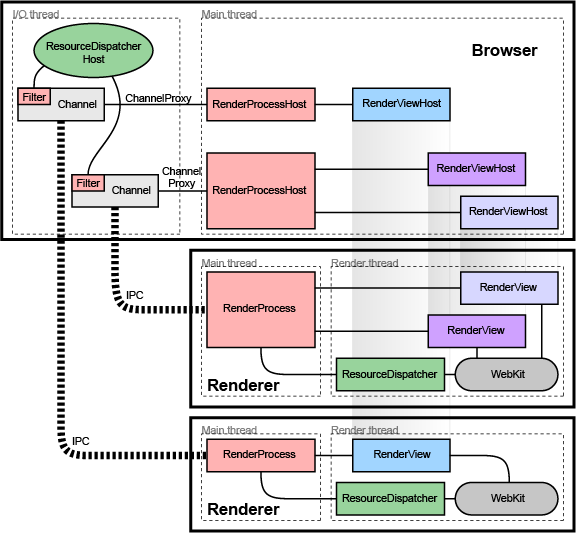
Each renderer has two threads (see the multi-process architecture page for a diagram, or threading in Chromium for how to program with them). The render thread is where the main objects such as the RenderView and all WebKit code run. When it communicates to the browser, messages are first sent to the main thread, which in turn dispatches the message to the browser process. Among other things, this allows us to send messages synchronously from the renderer to the browser. This happens for a small set of operations where a result from the browser is required to continue. An example is getting the cookies for a page when requested by JavaScript. The renderer thread will block, and the main thread will queue all messages that are received until the correct response is found. Any messages received in the meantime are subsequently posted to the renderer thread for normal processing.

The browser process


Low-level browser process objects

All IPC communication with the render processes is done on the I/O thread of the browser. This thread also handles all network communication which keeps it from interfering with the user interface.

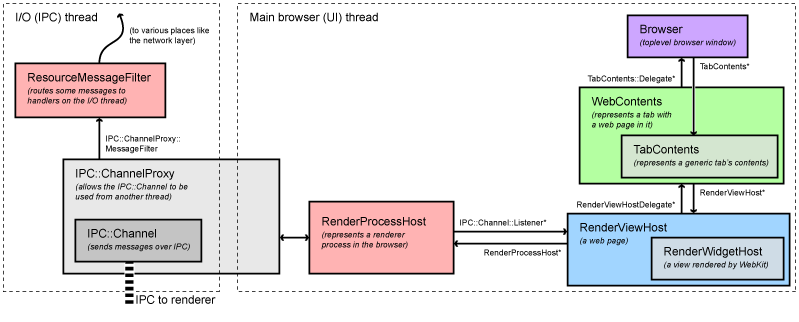
When a RenderProcessHost is initialized on the main thread (where the user interface runs), it creates the new process and a ChannelProxy IPC object. This object runs on the I/O thread of the browser, listening to the named pipe to the renderer, and automatically forwards all messages back to the RenderProcess on the UI thread. A ResourceMessageFilter will be installed in this channel which will filter out certain messages that can be handled directly on the I/O thread such as network requests. This filtering happens in ResourceMessageFilter::OnMessageReceived.

The RenderProcessHost on the UI thread is responsible for dispatching all view-specific messages to the appropriate RenderViewHost (it handles a limited number of non-view-specific messages itself). This dispatching happens in RenderProcessHost::OnMessageReceived.

High-level browser process objects

View-specific messages come into RenderViewHost::OnMessageReceived. Most of the messages are handled here, and the rest get forwarded to the RenderWidgetHost base class. These two objects map to the RenderView and the RenderWidget in the renderer (see "The Render Process" above for what these mean). On Microsoft Windows, we have a RenderWidgetHostHWND associated with each RenderWidgetHost that specifically manages events and drawing into a native HWND. Other systems will have a similar class for native input and painting.

Above the RenderView/Widget is the WebContents object, and most of the messages actually end up as function calls on that object. A WebContents represents the contents of a tab that shows web data. It derives from the generic TabContents class (there are a number of other specializations of TabContents for history and downloads, for example). It is the central switching point for most navigation and toplevel browser UI updating.

FAQ: Why are WebContents and RenderViewHost separate? These two objects provide different layers of functionality. You could think of RenderViewHost as Chromium's "multi-process embedding layer." RenderViewHost objects could be (but are not currently) used in other parts of the application to render content. For example, you could imagine a dialog box with a web view in it. This could use RenderViewHost to manage drawing and communication with the render process, but it would not have a "tab" or the normal navigation commands. The RenderViewHost forwards many messages to the WebContents via its RenderViewHostDelegate abstract interface. The WebContents handles the navigational state and anything related to the UI of the web browser. Our hypothetical dialog box wouldn't need any of this functionality and would only implement the parts of the RenderViewHostDelegate interface that it cares about.

Illustrative examples

Additional examples covering navigation and startup are in Getting Around the Chromium Source Code.

Life of a "set cursor" message

Setting the cursor is an example of a typical message that is sent from the renderer to the browser. In the renderer, here is what happens.
  • Set cursor messages are generated by WebKit internally, typically in response to an input event. The set cursor message will start out in RenderWidget::SetCursor in chrome/renderer/render_widget.cc.
  • It will call RenderWidget::Send to dispatch the message. This method is also used by RenderView to send messages to the browser. It will call RenderThread::Send.
  • This will call the IPC::SyncChannel which will internally proxy the message to the main thread of the renderer and post it to the named pipe for sending to the browser.

Then the browser takes control:

  • The IPC::ChannelProxy in the RenderProcessHost receives all message on the I/O thread of the browser. It first sends them through the ResourceMessageFilter that dispatches network requests and related messages directly on the I/O thread. Since our message is not filtered out, it continues on to the UI thread of the browser (the IPC::ChannelProxy does this internally).
  • RenderProcessHost::OnMessageReceived in chrome/browser/render_process_host.cc gets the messages for all views in the corresponding render process. It handles several types of messages directly, and for the rest forwards to the appropriate RenderViewHost corresponding to the source RenderView that sent the message.
  • The message arrives at RenderViewHost::OnMessageReceived in chrome/browser/render_view_host.cc. Many messages are handled here, but ours is not because it's a message sent from the RenderWidget and handled by the RenderWidgetHost.
  • All unhandled messages in RenderViewHost are automatically forwarded to the RenderWidgetHost, including our set cursor message.
  • The message map in chrome/browser/render_widget_host.cc finally receives the message in RenderWidgetHost::OnMsgSetCursor and calls the appropriate UI function to set the mouse cursor.

Life of a "mouse click" message

Sending a mouse click is a typical example of a message going from the browser to the renderer.

  • The Windows message is received on the UI thread of the browser by RenderWidgetHostHWND::OnMouseEvent which then calls ForwardMouseEventToRenderer in the same class.
  • The forwarder function packages the input event into a cross-platform WebMouseEvent and ends up send it to the RenderWigetHost it is associated with.
  • RenderWidgetHost::ForwardInputEvent creates an IPC message ViewMsg_HandleInputEvent, serializes the WebInputEvent to it, and calls RenderWigetHost::Send.
  • This just forwards to the owning RenderProcessHost::Send function, which in turn gives the message to the IPC::ChannelProxy.
  • Internally, the IPC::ChannelProxy will proxy the message to the I/O thread of the browser and write it to the named pipe to the corresponding renderer.

Note that many other types of messages are created in the WebContents, especially navigational ones. These follow a similar path from the WebContents to the RenderViewHost.

Then the renderer takes control:

  • IPC::Channel on the main thread of the renderer reads the message sent by the browser, and IPC::ChannelProxy proxies to the renderer thread.
  • RenderView::OnMessageReceived gets the message. Many types messages are handled here directly. Since the click message is not, it falls through (with all other unhandled messages) to RenderWidget::OnMessageReceived which in turn forwards it to RenderWidget::OnHandleInputEvent.
  • The input event is given to WebWidgetImpl::HandleInputEvent where it is converted to a WebKit PlatformMouseEvent class and given to the WebCore::Widget class inside WebKit.

Attachments (2)


Multi-process Architecture (Chromium Developer Documentation)

Multi-process Architecture (Chromium Developer Documentation)

Google Chrome is built with open source code from Chromium.

Except as otherwise noted, the content of this page is licensed under a Creative Commons Attribution 2.5 license, and examples are licensed under the BSD License.

Multi-process Architecture

This document describes Chromium's high-level architecture.

Problem

It's nearly impossible to build a rendering engine that never crashes or hangs. It's also nearly impossible to build a rendering engine that is perfectly secure.

In some ways, the current state of web browsers is like that of the single-user, co-operatively multi-tasked operating systems of the past. As a misbehaving application in such an operating system could take down the entire system, so can a misbehaving web page in a modern web browser. All it takes is one browser or plug-in bug to bring down the entire browser and all of the currently running tabs.

Modern operating systems are more robust because they put applications into separate processes that are walled off from one another. A crash in one application generally does not impair other applications or the integrity of the operating system, and each user's access to other users' data is restricted.

Architectural overview

We use separate processes for browser tabs to protect the overall application from bugs and glitches in the rendering engine. We also restrict access from each rendering engine process to others and to the rest of the system. In some ways, this brings to web browsing the benefits that memory protection and access control brought to operating systems.

We refer to the main process than runs the UI and manages tab and plugin processes as the "browser process" or "browser." Likewise, the tab-specific processes are called "render processes" or "renderers." The renderers use the WebKit open-source layout engine for interpreting and laying out HTML.

Managing render processes

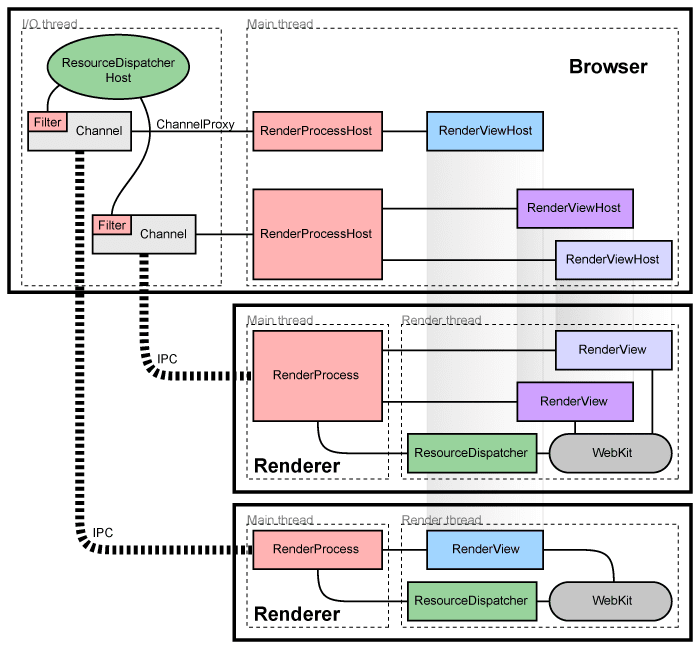
Each render process has a global RenderProcess object that manages communication with the parent browser process and maintains global state. The browser maintains a corresponding RenderProcessHost for each render process, which manages browser state and communication for the renderer. The browser and the renderers communicate using Chromium's IPC system.

Managing views

Each render process has one or more RenderView objects, managed by the RenderProcess, which correspond to tabs of content. The corresponding RenderProcessHost maintains a RenderViewHost corresponding to each view in the renderer. Each view is given a view ID that is used to differentiate multiple views in the same renderer. These IDs are unique inside one renderer but not within the browser, so identifying a view requires a RenderProcessHost and a view ID. Communication from the browser to a specific tab of content is done through these RenderViewHost objects, which know how to send messages through their RenderProcessHost to the RenderProcess and on to the RenderView.

Components and interfaces

In the render process:

  • The RenderProcess handles IPC with the corresponding RenderProcessHost in the browser. There is exactly one RenderProcess object per render process. This is how all browser ↔ renderer communication happens.
  • The RenderView object communicates with its corresponding RenderViewHost in the browser process (via the RenderProcess), and our WebKit embedding layer. This object represents the contents of one web page in a tab or popup window

In the browser process:

  • The Browser object represents a top-level browser window.
  • The RenderProcessHost object represents the browser side of a single browser ↔ renderer IPC connection. There is one RenderProcessHost in the browser process for each render process.
  • The RenderViewHost object encapsulates communication with the remote RenderView, and RenderWidgetHost handles the input and painting for RenderWidget in the browser.
For more detailed information on how this embedding works, see the How Chromium displays web pages design document.

Sharing the render process

In general, each new window or tab opens in a new process. The browser will spawn a new process and instruct it to create a single RenderView.

Sometimes it is necessary or desirable to share the render process between tabs or windows. A web application opens a new window that it expects to communicate synchronously, for example, window.open in JavaScript. In this case, when we create a new window or tab, we need to reuse the process that the window was opened with. We also have strategies to assign new tabs to existing processes if the total number of processes is too large, or if the user already has a process open navigated to that domain. These strategies are described in Process Models.

Detecting crashed or misbehaving renderers

Each IPC connection to a browser process watches the process handles. If these handles are signaled, the render process has crashed and the tabs are notified of the crash. For now, we show a "sad tab" screen that notifies the user that the renderer has crashed. The page can be reloaded by pressing the reload button or by starting a new navigation. When this happens, we notice that there is no process and create a new one.

Sandboxing the renderer

Given Webkit is running in a separate process, we have the opportunity to restrict its access to system resources. For example, we can ensure that the renderer's only access to the network is via its parent browser process. Likewise, we can restrict its access to the filesystem using the host operating system's built-in permissions.

In addition to restricting the renderer's access to the filesystem and network, we can also place limitations on its access to the user's display and related objects. We run each render process on a separate Windows "Desktop" which is not visible to the user. This prevents a compromised renderer from opening new windows or capturing keystrokes.

Giving back memory

Given renderers running in separate processes, it becomes straightforward to treat hidden tabs as lower priority. Normally, minimized processes on Windows have their memory automatically put into a pool of "available memory." In low-memory situations, Windows will swap this memory to disk before it swaps out higher-priority memory, helping to keep the user-visible programs more responsive. We can apply this same principle to hidden tabs. When a render process has no top-level tabs, we can release that process's "working set" size as a hint to the system to swap that memory out to disk first if necessary. Because we found that reducing the working set size also reduces tab switching performance when the user is switching between two tabs, we release this memory gradually. This means that if the user switches back to a recently used tab, that tab's memory is more likely to be paged in than less recently used tabs. Users with enough memory to run all their programs will not notice this process at all: Windows will only actually reclaim such data if it needs it, so there is no performance hit when there is ample memory.

This helps us get a more optimal memory footprint in low-memory situations. The memory associated with seldom-used background tabs can get entirely swapped out while foreground tabs' data can be entirely loaded into memory. In contrast, a single-process browser will have all tabs' data randomly distributed in its memory, and it is impossible to separate the used and unused data so cleanly, wasting both memory and performance.

Plug-ins

Firefox-style NPAPI plug-ins run in their own process, separate from renderers. This is described in detail in Plugin Architecture.

Resources

Attachments (2)